

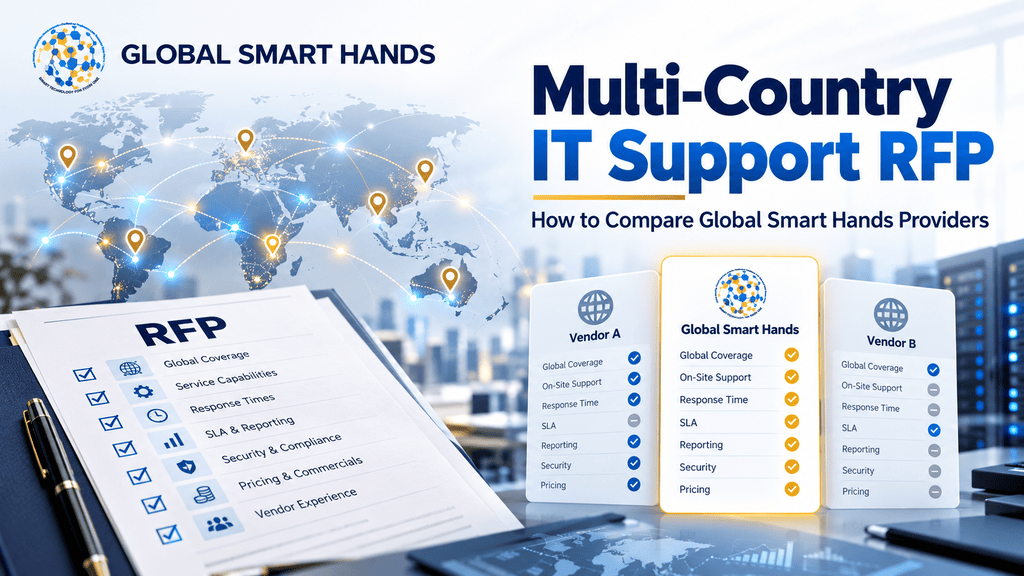


Sending one RFP to cover IT support in 10, 30 or 80 countries feels a bit like ordering dinner for a hundred strangers. Every vendor promises the same menu, yet nothing tastes the same once it lands.
To compare global smart hands providers fairly, test five things: verified coverage at your actual sites, how each SLA response time is measured, where spare parts sit, who the engineers really work for, and the total cost of a realistic ticket.
Then score every bid against one weighted matrix and run a short paid pilot in your hardest countries before you sign. In this guide, we are going to walk through each step, with a copy-ready scoring table and the red flags most buyers spot too late.
Why a Multi-Country IT Support RFP Needs Its Own Playbook
A single-country support contract is fairly simple. A multi-country IT support RFP multiplies every variable: labour laws, customs rules, time zones, data protection regimes and site access policies.
The stakes keep climbing too. Gartner’s April 2026 forecast puts worldwide IT services spending at about $1.87 trillion in 2026, up 9% on 2025.
A growing slice of that goes to smart hands services because hiring locally keeps getting harder. IDC predicted that more than 90% of organisations would feel the IT skills shortage by 2026, at a cost of $5.5 trillion.
Then there’s risk. In Uptime Institute’s 2026 outage analysis, 57% of respondents said their latest major outage cost over $100,000, and one in five put it above $1 million.
Your IT field services partner decides how quickly those incidents end. For the day-to-day basics, see our guide to IT support services for global businesses.
What to Prepare Before You Issue the RFP
Vendors can only price what you show them, and vague RFPs get vague, padded quotes.
Your RFP pack should include:
- A site list with full addresses, site type and opening hours
- An asset inventory per site, including make, model and warranty status
- 12 months of ticket history by country, priority and fix type
- The services you need, such as break-fix, deployments, surveys and end-user support
- Required SLA tiers per site, not one blanket tier for everything
- Language needs and site access rules
- Your preferred commercial model: pay-per-visit, retainer or monthly SLA fee
If your asset data looks shaky, a pre-RFP site survey gives every bidder the same starting picture. And list your IMAC (installs, moves, adds and changes) volumes separately from break-fix.
How to Run the RFP in Five Stages
A clear process keeps vendors honest and stops stakeholders moving the goalposts.
- Scope: Build the RFP pack above and agree your scoring weights.
- Shortlist: Send a short RFI to a wider group, then invite three to five providers to bid.
- Price: Ask every bidder to price the same sample tickets.
- Pilot: Run a paid pilot in two or three of your toughest countries.
- Award: Sign, onboard your sites and book a 90-day performance review.
Six Vendor Evaluation Criteria That Separate Strong Global Smart Hands Providers
Most bids look identical on page one. These six vendor evaluation criteria show you which ones hold up in the field.
1. Real Coverage, Not a Country Count
“150+ countries” looks great on a slide, but coverage depends on who actually delivers it. Some providers employ engineers, some use vetted partners, and some post your ticket on a freelance marketplace and hope someone accepts it.
Ask each bidder for a coverage matrix that lists every site with:
- The dispatch model: employee, partner or freelancer
- The SLA tier they’ll commit to at that exact address
- Their ticket volume in that country over the last 12 months
Pay close attention to secondary cities and emerging markets, where on-site IT support gets genuinely tricky.
2. How the SLA Response Time Is Actually Measured
Here’s where most comparisons go wrong. One vendor’s “4-hour SLA” rarely means the same as another’s.
Pin down three things in writing:
- Clock start: Does it start when you log the ticket or when the vendor accepts it?
- Clock type: Does it run 24/7 or only during local business hours?
- Clock stop: Does a phone call stop it, or only an engineer on site or a working fix?
A vendor can hit a 4-hour response target and still leave a store offline for two days. Our guide to 4-hour SLA standards for international IT support shows how to match each tier to business impact.
3. Spare Parts and Customs
This is the point most checklists miss. Your engineer can arrive in four hours, but a replacement part shipped from another country may spend days in customs.
Cross-border IT hardware often needs an importer of record, paid duties and correct paperwork before it clears. So ask each provider:
- Where their stocking locations sit relative to your sites
- Whether they act as importer of record in each country, or expect you to
- Who owns the part in transit and who pays the duties
If a provider can’t answer quickly, its 4-hour promise covers labour only, not the fix.
4. Engineer Quality and Site Access
Ask how each provider vets engineers: background checks, certifications such as CompTIA, Cisco or Microsoft, and skills testing. Then ask how they keep the same faces on your sites, because returning engineers fix faster.
One detail trips up a lot of buyers. Many colocation data centres only admit people named on your access list. Ask bidders to pre-register a named pool of engineers per facility, or your 4-hour SLA becomes a queue at the security desk.
5. Security and Compliance
Every country brings its own rules. Engineers handling EU personal data must work within GDPR, and anyone touching card payment terminals needs to follow PCI DSS.
Ask for written data handling steps, disk sanitisation and disposal procedures, insurance certificates and subcontractor controls. Also check who signs the data processing agreement when a local partner does the work.
Germany shows how detailed this gets, as our guide to GDPR-compliant on-site IT support in Germany explains.
6. Reporting, Escalation and One Point of Contact
Multi-country contracts fall apart when you need five phone numbers to escalate one issue. Look for one service desk, a named account manager, monthly SLA reports by country and photo-backed job sheets.
The same Uptime report names failure to follow procedures as the leading driver of human error outages, so ask to see the vendor’s method of procedure templates.
How to Compare Pricing Without Getting Burned
Hourly rates tell you very little on their own. One provider quotes $75 an hour with a four-hour minimum, another $110 with a one-hour minimum. For a 45-minute swap, the “cheaper” rate costs $300 and the pricier one $110.
So write a few sample tickets and ask everyone to price them:
- A P1 server fault at a data centre at 2am on a Sunday
- A P3 laptop swap at a regional office during business hours
- A 40-store EPOS refresh across three countries
- An abortive visit because the site was locked
Then check the small print for travel time, out-of-hours multipliers, parts mark-up and currency. Some countries also apply withholding tax to cross-border service fees, so ask whether the vendor can invoice locally.
For regional benchmarks, see on-site IT support costs across Europe in 2026. With steady volumes, compare full-time IT resources vs SLA-based support before choosing a model.
And remember the cost of getting it wrong. ITIC’s 2024 downtime survey found one hour of downtime costs over 90% of mid-size and large enterprises more than $300,000. The cheapest bid rarely stays cheapest.
A Weighted Scoring Matrix You Can Copy
Scoring keeps the decision fair when several stakeholders sit on the panel. Score each bid from 1 to 5 per criterion, multiply by the weight and add it up. Adjust weights to your risk profile, but agree on them before you open a single proposal.
| Criterion | Weight | What a 5/5 looks like |
|---|---|---|
| Verified coverage | 20% | Named dispatch model and SLA tier at every one of your addresses |
| SLA response time and resolution | 20% | A 24/7 clock that starts when you log the ticket, backed by service credits |
| Total cost of scenarios | 15% | Lowest realistic total across your sample tickets, with no hidden extras |
| Spares and customs | 15% | Stock near your sites and importer of record handled in each country |
| Engineer quality and access | 10% | Vetted, certified engineers pre-registered at your facilities |
| Security and compliance | 10% | Documented GDPR, PCI DSS and disk handling processes |
| Reporting and governance | 10% | One service desk, monthly country reports and a named account lead |
| Total | 100% |
Use this table as your smart hands RFP checklist during vendor demos too. If a bidder dodges a row, score it a 1.
Red Flags to Watch During Vendor Evaluation
Some warning signs show up early if you know where to look:
- Coverage claims with no site-by-site commitment
- “Response” times that stop the clock on a phone call
- No service credits or penalties for missed SLAs
- No client references in your regions
- Heavy subcontracting with no visibility of who turns up
- A vague “other charges” line in the price sheet
- A sales team that can’t name its stocking locations
Run a Paid Pilot Before You Sign
Proposals show intent. Pilots show reality.
Pick two or three of your hardest locations, not your easiest, and run real tickets for 60 to 90 days. Track first-time fix rate, arrival times, job sheet quality and how the vendor handles a mistake.
Agree the success measures before day one, so nobody argues about the results later. A strong provider welcomes a pilot because it gets a fair chance to prove itself. A weak one suddenly finds reasons to skip it.
How Global Smart Hands Supports Your Multi-Country IT Support RFP
If you’re building a shortlist, Global Smart Hands deserves a place on it. The London-based team acts as a global IT support provider for MSPs, resellers, integrators and enterprises that need skilled hands on site without hiring local staff.
Coverage Built Around Your Sites
Global Smart Hands offers on-site support in 150+ countries through a network of more than 5,000 engineers. The team commits to a 4-hour response in major cities and next-business-day attendance in remote areas. You can check the full global coverage list before you share your site list.
SLA Options That Match Business Impact
Instead of one blanket tier, you can mix 4, 6 and 8-hour and next-business-day response by site. The Resource on SLA model gives you skilled engineers on demand, while a full-time IT resource suits steady, high-volume locations.
Services That Map to a Typical RFP Scope
- 24×7 international IT support and third-party maintenance
- Break-fix, IMAC and desktop deployments
- EPOS and retail support for store networks
- Network and IT infrastructure support
- Pre and post-deployment site surveys
White-Label Delivery for MSPs and Resellers
Global Smart Hands regularly works under partner brands, so your clients see your name on every job. Learn how white-label smart hands lets you expand globally without building local teams.
Ready to Compare Global Smart Hands Providers With Confidence?
Comparing global smart hands providers gets much easier once you stop judging the sales deck and start testing the delivery.
Build a detailed RFP pack, demand a site-by-site coverage matrix and pin down how each SLA clock works. Check where spare parts live, price real scenarios instead of hourly rates and score every bid on the same weighted matrix. Then back your choice with a paid pilot in your toughest countries.
Follow those steps and your multi-country IT support RFP becomes a fair, defensible decision rather than a gamble.
Want a partner who’s happy to be tested this way? Contact the Global Smart Hands team for a site-by-site quote and coverage plan built around your locations.
Frequently Asked Questions
What does a smart hands engineer do in a data centre?
Typical tasks include racking and stacking servers, cabling and patching, swapping failed drives or power supplies, labelling, power cycling and helping remote engineers run diagnostics.
Is smart hands the same as managed IT services?
No. Managed IT services usually cover ongoing monitoring and management of your whole environment. Smart hands supplies skilled on-site labour when needed, often supporting an MSP or internal IT team.
What is the difference between an RFP, RFI and RFQ?
An RFI gathers general information about possible vendors. An RFP asks shortlisted vendors for a detailed proposal on how they’ll deliver. An RFQ asks for prices on a clearly defined scope.
How long does an RFP process take?
Many IT services RFPs take around six to ten weeks from drafting to award. Multi-country deals with pilots and legal reviews across several jurisdictions often take a few months.
What is break-fix IT support?
Break-fix support means a provider repairs hardware or software after it fails, usually billed per incident. It suits unpredictable faults but gives you less cost certainty than a contracted SLA.
What is third-party maintenance (TPM)?
Third-party maintenance means an independent provider supports your hardware instead of the original manufacturer, often after warranty ends. It usually costs less and can extend the useful life of equipment.