




A blank screen by the till sends a message no retailer wants to send. Now picture that across 300 stores in 15 countries, each with different walls, landlords and network setups. That’s the reality of digital signage for retail chains, and it’s why planning matters more than the screens themselves.
Retail digital signage installation for chains works best as a repeatable programme, not a one-off project. You survey each site, prove the design in a pilot store, ship standard kits, install during agreed windows, and test every screen before handover.
After the go-live process, remote monitoring catches faults early, while local engineers fix hardware on-site under a clear SLA, so screens stay lit and content stays accurate. In this blog, we walk through each stage, share the bottlenecks most guides skip, and show what good digital signage support looks like once the screens go live.
Why Retail Digital Signage Matters More Than Ever
Screens aren’t just nice-to-have décor anymore. The numbers show they move products and, more and more, earn money of their own.
- Market growth: The Business Research Company expects the global digital signage market to pass $36 billion by 2030, growing at about 10% a year, according to Digital Signage Today in October 2026.
- Proven sales lift: A peer-reviewed study of 237 campaigns and roughly 30 million shopper visits found that shoppers who saw in-store screen ads were 8.1% more likely to buy the advertised product (Sixteen:Nine).
- Retail media money: WARC forecasts global retail media ad spend of $200.4 billion in 2026 and names in-store screens as one of the least developed parts of that market (invidis).
So when a screen goes dark, you lose more than a promo. You may lose ad revenue too. That’s why installation and support deserve the same care as your content.
What Retail Digital Signage Installation Actually Covers
Hanging a screen is the easy bit. A proper install covers six layers, and your engineers need to check each one at every store.
| Layer | What It Does | What to Check on Site |
|---|---|---|
| Display or LED wall | Shows your content | Wall strength, viewing distance, glare |
| Media player | Stores and plays content | Ventilation, easy access for swaps |
| Mount or enclosure | Holds the screen safely | Load rating, VESA fit, landlord rules |
| Power | Keeps everything running | Dedicated socket, surge protection, on/off schedule |
| Network | Delivers content and updates | Wired drop or separate VLAN, open firewall ports |
| CMS (content management system) | Schedules and controls content | Device enrolment, user roles, proof-of-play reports |
Get one layer wrong and the whole screen fails, even when the panel works perfectly. That’s why good digital signage installation services cover all six layers, not just the bracket and the screen.
How a Multi-Site Digital Signage Rollout Works
A good multi-site digital signage rollout feels a bit boring, and that’s the goal. Every store follows the same playbook, so surprises stay small and cheap.
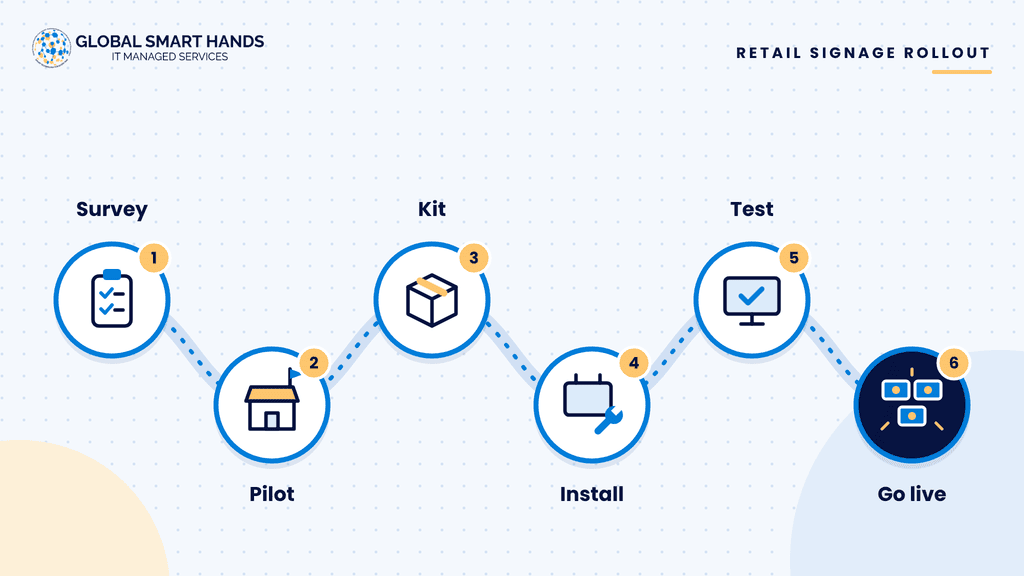
1. Survey Every Store Before You Order Kit
Measure the walls, check power and data points, and photograph each location. Note sunlight, sightlines and anything that blocks the view, like shelving, columns or hanging displays.
Our guide on why pre-deployment site surveys are crucial for seamless rollouts explains how a survey prevents costly second visits.
2. Prove the Design in a Pilot Store
Run the full setup in one or two stores for a few weeks. Test content scheduling, network behaviour at peak trading hours and how store staff react to the screens.
Once everything works, lock it in as your “golden build”. Every other store then copies it exactly.
3. Standardise and Pre-Stage the Kit
- Pre-load each media player with its operating system, CMS agent and network settings
- Label cables and brackets by store and by wall
- Pack one kit per site, with a spare player for larger stores
Pre-staging cuts on-site time sharply. It’s the same approach that helps smart hands teams speed up EPOS rollouts across regions.
4. Install, Test and Sign Off
Engineers mount, connect and power each screen, then work through a test checklist before they leave:
- Content plays and matches the schedule
- The player keeps playing when you unplug the network
- Screens switch on and off at the set times
- The CMS shows the device online
- Photos go into the sign-off pack
A quick post-project site survey then closes the loop and gives you an accurate asset record.
The Rollout Bottleneck Nobody Puts in the Plan
Here’s what most installation guides miss. In a chain rollout, the screens rarely slow you down. Site access does.
- Landlord approvals: Shopping centres often want method statements, risk assessments and insurance certificates before anyone drills a wall.
- Tight install windows: Many malls only allow noisy work before opening or after closing, so you might get three or four hours a night.
- Different walls everywhere: You might find plasterboard in one city and concrete or glass in the next. Each needs different fixings.
- Customs delays for spares: A large panel shipped across borders can sit in customs for days, so regional spares stock keeps fix times short.
Our tip? Treat approvals as a scheduled task with a named owner, and book engineers who know local site rules. Across a big estate, that alone can save weeks.
Why Digital Signage Support Matters After Go-Live
Installation is a moment. Support lasts for years, and store problems add up fast: Coresight Research data cited by EMARKETER shows retailers lost an average of 6.4% of gross sales to in-store operational failures, up from 5.5% in 2025.
Most Faults Aren’t the Screen
When a screen goes dark, the panel is often fine. The usual suspects sit around it.
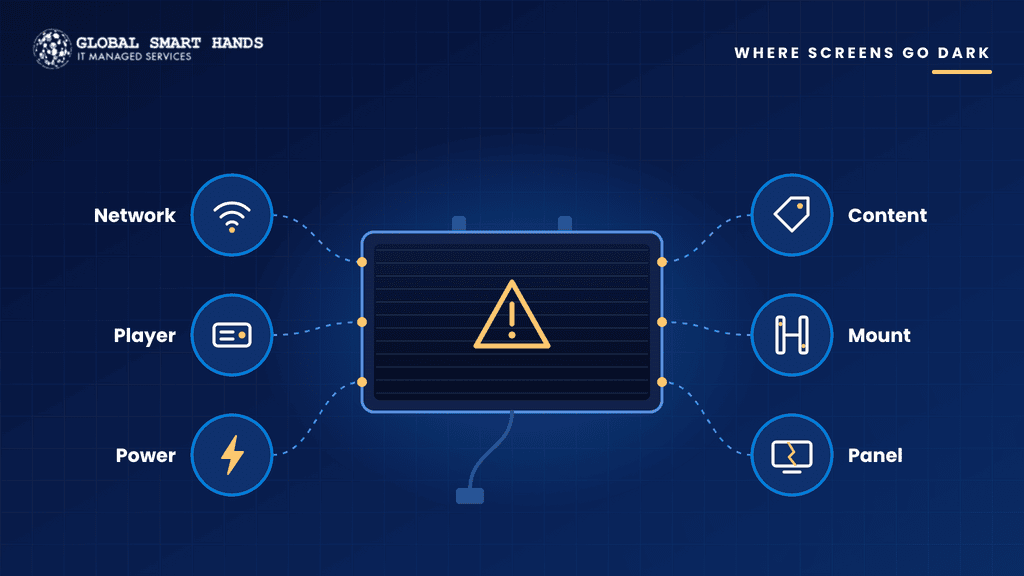
- A frozen media player or app
- A dropped network connection
- A wrong power schedule, or a cleaner who flicked the switch
- Expired or wrong content, like last week’s price
- A loose cable or a mount that has shifted
Our guide shows you how to minimise downtime across retail locations.
Digital Signage Remote Monitoring Catches Problems First
Signage platform signageOS notes that teams often hear about a dark screen from customers first. Standard IT tools confirm a device is online yet miss a frozen app or a screen stuck on the wrong input.
Good digital signage remote monitoring adds:
- Live screenshots from every screen
- Alerts for offline, frozen or overheating devices
- Automatic reboots and content re-syncs
A Tiered Support Model Keeps Costs Sensible
Not every fault needs a site visit. Smart chains escalate in four steps.
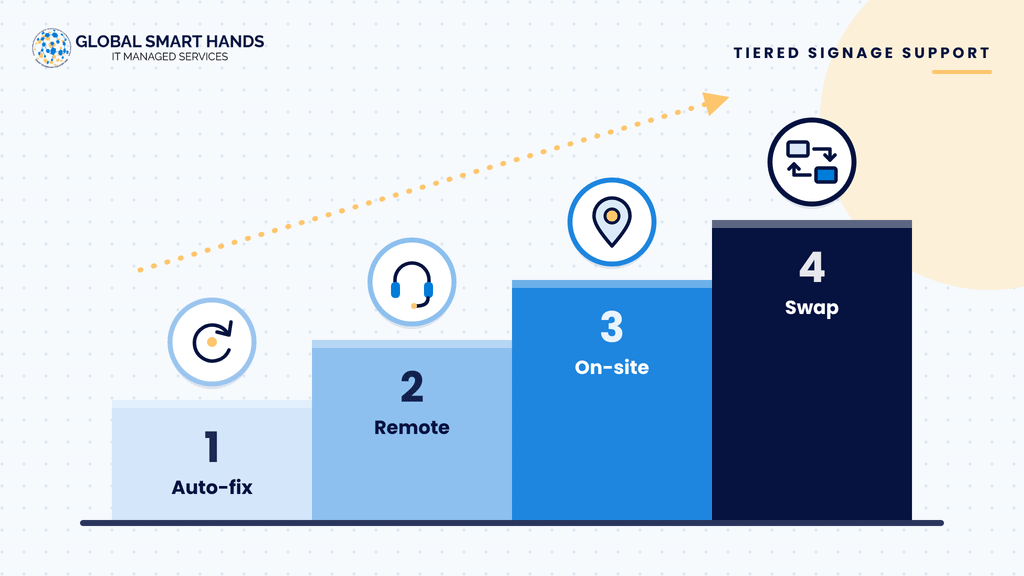
- Auto-fix: The platform reboots or re-syncs the player on its own.
- Remote: A helpdesk engineer resets settings or pushes a fix.
- On-site: A local engineer provides on-site digital signage support for hardware faults.
- Swap: The engineer fits a hot spare and sends the faulty unit for repair.
Agree response times for each tier in your SLA. Our breakdown of 4-hour SLA standards for international IT support explains what fast on-site cover looks like.
Uptime Now Has a Price Tag
Here’s a nuance many chains overlook. If your screens carry paid ads from suppliers, those brands expect proof-of-play reports. A dark screen can mean refunding ad slots, not just missing a promo.
So match your SLA to your ad commitments. Busy flagship stores may need faster response than small outlets.
Digital Signage Maintenance Checklist
Preventive digital signage maintenance stops small issues from turning into store visits. Here’s a simple rhythm to follow:
- Daily (automated): Check online status, screenshots and alerts.
- Weekly: Audit content for expired promos and confirm screen prices match your POS.
- Quarterly: Update player software and firmware (pilot store first), clean screens and vents, and check mounts and cables.
- Yearly: Review brightness and colour, replace ageing players and top up regional spares.
In-House vs Outsourced Digital Signage Support
Most chains don’t pick one or the other. HQ teams usually own content and the CMS, while a field partner handles the hands-on work. Here’s how the two compare:
| Factor | In-House Team | Outsourced Field Partner |
|---|---|---|
| Coverage | Where your staff live | Engineers across many countries |
| Response time | Depends on travel | Set by SLA, often 4 hours in major cities |
| Cost | Fixed salaries plus travel | Pay per visit or per contract |
| Rollout capacity | Hard to scale up fast | Scales up for projects, down after |
| Local know-how | Strong near HQ | Knows local site rules and languages |
| Control | Full | Shared, backed by SLA reporting |
If you manage IT for retail, banking or enterprise branch networks, a blended model usually gives you the best of both.
How Global Smart Hands Supports Digital Signage for Retail Chains
Global Smart Hands is a London-based IT field services company with 5,000+ engineers covering 150+ countries, 24/7, 365 days a year. For retailers, MSPs and integrators, that means one partner for every store, wherever it sits.
Site Surveys Before and After Deployment
GSH engineers carry out pre- and post-deployment site surveys, recording wall types, power, network points and asset details so your rollout plan reflects reality.
Installation, Rollouts and IMAC Work
From first install to store refits, GSH handles screen mounting, media player setup, cabling and relocations through its IMAC services (installs, moves, adds and changes).
EPOS and Retail Tech Expertise
Because GSH engineers already provide EPOS and retail support, one visit can cover the till and the screen. That helps keep on-screen prices and POS data in step.
24/7 Break-Fix with Fast Response
GSH offers 24×7 international IT support with up to 4-hour engineer response in major cities, plus next-business-day or scheduled visit options. Engineers can fit hot spares, so stores keep trading while a service centre repairs the faulty kit.
In-Store Network Support
Screens rely on the store network. The GSH network and IT infrastructure team helps set up and maintain the wired links, switches and segmentation your signage needs.
White-Label Delivery for Partners
Signage vendors and MSPs can send GSH engineers to site under their own brand. Our guide to white-label smart hands explains how it works.
Keep Every Store Screen Bright and Working
Retail digital signage installation pays off when you treat it as a repeatable programme. Survey every site, prove the design in a pilot store, pre-stage your kit and test each screen before sign-off.
Plan for the bottlenecks most guides ignore, like landlord approvals, tight install windows and cross-border spares. After go-live, digital signage remote monitoring, a tiered support model and a steady maintenance rhythm keep screens lit, prices accurate and ad commitments safe.
Ready to roll out or support screens across your stores? Talk to Global Smart Hands today for local engineers, clear SLAs and 24/7 cover wherever your stores trade.
Frequently Asked Questions
How long does a digital signage installation take?
A single screen on a ready wall often takes a couple of hours. Video walls, new cabling or several screens can stretch one store to a full shift or an overnight job.
Can I use a regular TV for digital signage?
You can, but it’s risky. Consumer TVs aren’t built for long daily run times, and many manufacturers void the warranty in commercial use. Commercial displays handle longer hours and remote management.
How long do digital signage displays last?
Manufacturers commonly rate commercial LCD panels for around 50,000 hours or more. Real lifespan depends on run time, heat and brightness, so screens in sunny windows usually age faster.
What are the main types of retail digital signage?
The common types are wall-mounted screens, LED video walls, shop window displays, digital menu boards, interactive kiosks and shelf-edge displays. Many chains mix several types in one store.
What height should digital signage be mounted at?
For close viewing, centre the screen near eye level, roughly 1.5 to 1.7 metres from the floor. Mount it higher when shoppers view it from across the store or above crowds.