





Moving offices is exciting. New space, new energy, maybe even a decent coffee machine this time. Underneath all that, though, sits one very real risk: your IT systems going dark on day one.
An office relocation IT checklist is a structured plan that covers every technical step of a business move, from auditing your current hardware to testing the network before your team sits down at their new desks. It covers data backup, connectivity, cabling, telecoms, security and equipment disposal, and it turns a stressful move into a smooth, almost boring, transition.
Whether you call it an office relocation IT checklist or an IT office move checklist, the fundamentals stay the same. In this blog, we are going to thoroughly discuss about UK businesses through realistic timelines, the tasks that matter most, and the regulatory checks you cannot afford to skip.
Why IT Planning Makes or Breaks Your Office Move
IT problems are the most common reason office moves turn stressful. Office stuff like desks and chairs are easy to shift. However, the servers, phone lines and Wi-Fi are not that easy to transfer as they are the part of your whole IT infrastructure.
The financial risk is real too. Analysts at Gartner put the average cost of IT downtime at $5,600 a minute, a figure still widely used as the baseline for business continuity planning. Even a few hours offline during a move can mean a serious hit to revenue and client trust, which is exactly why you want to minimise downtime during an office move rather than hope for the best.
Hybrid working has changed the shape of the problem too. Office for National Statistics figures show that more than a quarter of UK workers now hybrid work, splitting their week between home and the office. Average UK office occupancy sits at around 40%, which means fewer businesses are moving a strict one desk per person setup, though the network still needs to handle peak collaboration days without buckling.
Planning ahead is not optional. Research covered by Business Manchester found that companies planning their move 12 to 18 months out face far less disruption than those who leave it late. For the fuller case on why outsourcing its worth understanding what IMAC services are and why you should outsource them.
When to Start: A Realistic IT Relocation Timeline
There is no single right time to start, but the pattern across UK relocations is consistent. Bigger moves need more runway. Use the table below as a starting point, then adjust it for the size of your IT estate.
| Timeframe | Key IT Tasks |
|---|---|
| 6 to 12 months before | Form a relocation team that includes IT, audit hardware and software, agree a budget with 10 to 15% contingency. |
| 3 to 6 months before | Book ISP and telecom installation, survey the new site for cabling and power, order long lead time hardware. |
| 4 to 8 weeks before | Confirm server room specifications, test backup and disaster recovery, start updating your address on official records. |
| 1 to 2 weeks before | Label and inventory every device, confirm engineer availability for move day, brief staff on the plan. |
| Move day | Move IT equipment last, install it first, test every connection before staff arrive. |
| First week after | Fix snags, gather staff feedback, log lessons for the next move. |
6 to 12 Months Before: Build Your Team and Budget
Start by naming an IT lead for the move, even if you plan to outsource the heavy lifting. This person owns the checklist and reports progress back to the wider project team.
Audit every device, licence and contract you currently hold. You cannot plan properly for what you have not counted. This is also the point to size your budget, and it pays to include a contingency of 10 to 15% for the unexpected extras that always seem to show up.
3 to 6 Months Before: Lock In Connectivity
Broadband and leased line installations often take far longer than people expect. Some fibre installs run past 90 days when new groundwork is needed, so book this the moment your new address is confirmed.
Visit the new site with your IT provider or network and IT infrastructure specialist. Check where power points, air conditioning and structured cabling need to go before the fit out closes those walls up for good.
Moving Day: Move IT Last, Install It First
On the day itself, IT equipment should be the last thing packed at the old office and the first thing unpacked at the new one. That sequencing keeps your team working for as long as possible and gets them back online just as fast.
Test everything before anyone sits down to work. Wi-Fi coverage, phone lines, printers, door access and the internet connection itself all need a proper check, not a quick glance, before you call the move complete.
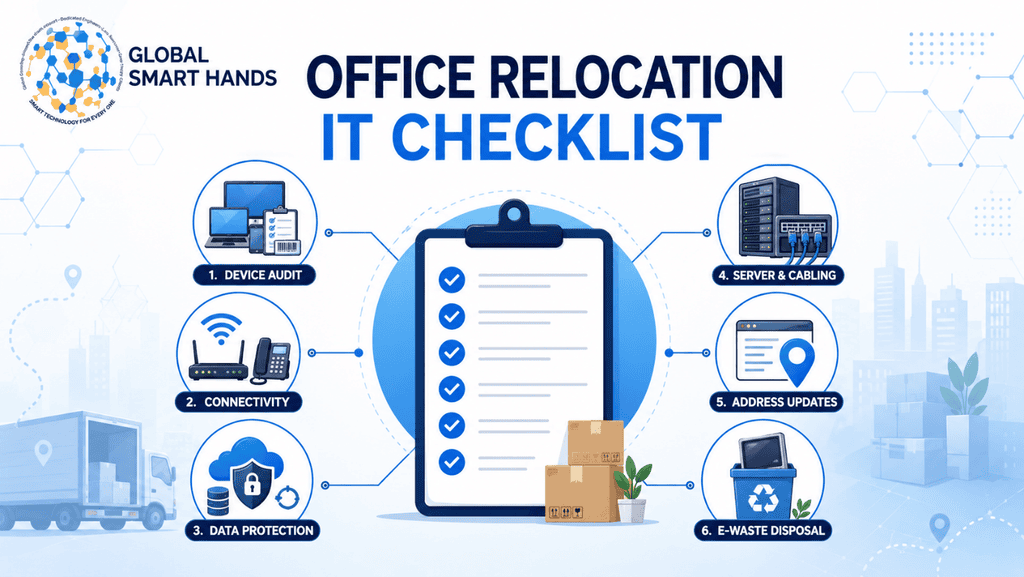
Building Your Office Relocation IT Checklist: Core Task Areas
Beyond the timeline, a handful of task areas deserve dedicated attention. Treat each one as its own mini project with a named owner, not a line on someone’s already long to do list.
Audit and Inventory Every Device
Before you touch a single cable, list every laptop, monitor, server, router and peripheral you own, along with its condition and current user.
This inventory does three jobs. It tells your mover exactly what needs transporting, it flags kit that is due for replacement rather than relocation, and it gives you a baseline to check nothing has gone missing once you unpack.
Plan Connectivity and Telecoms Early
Internet and phone lines are consistently the slowest part of an office move, and the part most businesses underestimate.
Contact your internet service provider and phone carrier as soon as you have a confirmed address, ideally months ahead. Ask for a written installation date and a backup plan if that date slips. A 4G or 5G failover router is cheap insurance against a delayed fibre install.
Protect Your Data Before You Move a Single Box
Data loss during a move is avoidable, but only if you plan for it properly. Back up every server, shared drive and critical system before moving day, and store that backup somewhere entirely separate from the hardware being transported.
Test the restore process too, not just the backup itself. A backup you have never restored is a hope, not a plan. If personal data is affected by any incident during the move, UK GDPR gives you a strict 72 hour window to report a notifiable breach to the ICO.
Prepare the Server Room and Network Cabling
Your new server room needs to meet the same standards as the old one, sometimes higher. Check power capacity, cooling, physical security and room dimensions before you sign the lease, not after.
Structured cabling should be planned around your floor plan, not squeezed in afterwards. A proper site survey means cabling, power and desk layouts work together instead of fighting each other on move day.
Update Your Business Address Across Every System
IT is not just hardware. Your business address lives inside dozens of systems that need updating too, and it is easy to miss one.
Companies House must be told within 14 days of a registered office change, using form AD01. HMRC needs updating within 30 days for VAT purposes. Update your website, email signatures, invoicing software and any record that stores your ICO registration details as well.
Dispose of Old IT Equipment Responsibly
A move is the natural moment to retire old kit, but you cannot just put it in a skip. Under the WEEE Regulations, business electronic waste must be collected separately by a licensed carrier and kept out of general waste entirely.
Before any device leaves your building, make sure its data has been properly wiped or destroyed, not just deleted. Keep the duty of care documentation and any certificate of destruction, because you remain legally responsible for that equipment even after it leaves site.

Common Mistakes UK Businesses Make During an Office IT Move
Even experienced teams get business IT relocation wrong in the same few ways. Watch out for these.
- Leaving telecoms until the last month, then discovering the new line will not be ready in time
- Assuming a general removals company understands server grade equipment the same way it understands office chairs
- Skipping a proper backup restore test, then discovering the backup was corrupted after the move
- Forgetting to update the business address with the ICO, Companies House and key suppliers
- Planning for the old headcount instead of today’s hybrid pattern of desk use
- Treating IT as one line item instead of its own workstream with a named owner
None of these mistakes are exotic. They are ordinary planning gaps that turn up again and again, which is exactly why a written checklist, actually checked off by a real person, catches them before they become a problem on moving day.
How Global Smart Hands Supports Your Office Relocation IT Checklist
Working through this checklist alone is entirely possible, but many UK businesses choose specialist support for the technical heavy lifting. Global Smart Hands provides exactly that kind of hands-on office IT relocation support, backed by a global network of more than 5,000 engineers across 150-plus countries, including UK-wide coverage for office moves of any size.
IMAC Services for Office Moves
Global Smart Hands IMAC services, short for installs, moves, adds and changes, cover the physical and technical side of your relocation. That includes safely disconnecting, transporting and reinstalling servers, workstations and network equipment, with documentation at every step so nothing goes missing between sites.
Site Surveys Before You Sign the Lease
Before you commit to a new space, a proper site survey checks that it can actually support your IT setup: power capacity, cabling routes, server room conditions and network coverage. Global Smart Hands offers pre and post deployment site surveys so surprises get caught on paper, not on moving day.
24/7 Support After You Move In
The first few weeks in a new office are when small IT issues tend to surface, from a flaky access point to a printer that will not connect. Global Smart Hands backs up every relocation with 24/7 international IT support, so help stays available while your team settles in.
Ready to Plan Your Move?
A solid office relocation IT checklist is what separates a smooth move from a stressful one. Start early, treat IT as its own workstream, back up everything before you touch a cable, and test the new connection before anyone sits down to work.
If you would rather hand the technical side to a team that does this every day, Global Smart Hands can support your move from site survey through to post move support, anywhere in the UK or beyond. Get in touch to talk through your relocation and build an IT plan that keeps your business running from day one in the new office.
Frequently Asked Questions
How far in advance should I start planning IT for an office move?
Start three to six months ahead for a typical office. Larger moves with complex server rooms or multiple sites need six to twelve months, since telecoms and cabling take real time to arrange.
What should be backed up before an office relocation?
Back up every server, shared drive, database and critical system, plus configuration files and licences. Store the backup off site, away from the equipment being transported, and test that it actually restores.
How long does an average office IT move take?
Most single site moves take one to three days to fully restore normal operations, assuming the new site was properly surveyed and cabled in advance. Complex, multi site moves take noticeably longer.
Do I need to tell Companies House when my office moves?
Yes. You must notify Companies House within 14 days of a registered office change using form AD01, then update HMRC separately within 30 days for VAT purposes.
What is the biggest IT risk during an office relocation?
Data loss and extended downtime top the list. Both usually stem from the same root cause: rushed backup testing and late connectivity planning, rather than the physical move itself.
Should I hire a specialist for office IT relocation or handle it in-house?
Small, simple moves can often be handled in-house. Complex server rooms, multi site moves or tight downtime windows usually benefit from a specialist IMAC or IT relocation provider.